Version History
Automatic Snapshots
Every time you save changes to a character, an automatic snapshot is created. This includes edits, level ups, and any other modifications. Each snapshot records the full character state as JSON, the change type, and a description of what changed.
Viewing History
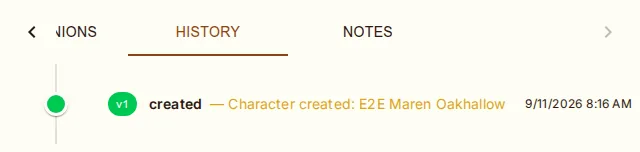
Open the History tab on the character sheet to see a timeline of all versions. Each entry shows:
Version number (v1, v2, v3...)
Change type badge — created, edited, level_up, rollback, dm-grant, dm-revoke, transferred, foundry-import
Change description
Timestamp
Comparing Versions
Each snapshot in the History tab has a Compare button (compare arrows icon) that opens a side-by-side diff dialog comparing that version against the current character state.
The comparison dialog shows changes grouped by field:
Ability scores, HP, XP, and other numeric stats
Class levels and subclass selections
Features, spells, and items
Proficiencies, languages, and other character data
Each change is marked as added, removed, or modified with resolved entity names (not raw IDs) for easy reading.
Rolling Back
Click the Restore button (yellow icon) on any previous version to roll back. A confirmation dialog appears. Rolling back:
Restores all character data (abilities, HP, items, spells, features, etc.) from that version
Creates a new snapshot recording the rollback (so you can undo the undo)
Does not delete any version history