Combat & Rest
Attacks
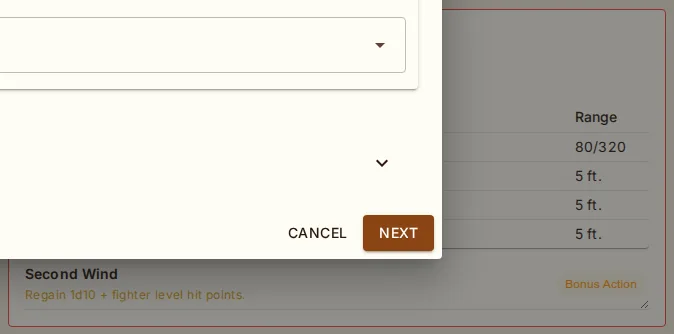
The Attacks section (above the tabs on the character sheet) automatically generates attack entries from your equipped weapons. Calculations include:
To Hit = Ability modifier + Proficiency bonus + magic bonus + fighting style + custom
Ability = STR for melee, DEX for ranged, best of STR/DEX for finesse, CHA for Hex Warrior, INT for Battle Smith
Proficiency checked by weapon name, category (simple/martial), Hexblade martial, or Pact Weapon
Fighting Styles auto-detected: Archery (+2 ranged hit), Dueling (+2 1H damage), Thrown Weapon (+2 thrown damage), Great Weapon Fighting (reroll note)
Hover over the To Hit or Damage values to see a tooltip breakdown showing where each number comes from. Click To Hit to roll an attack, click Damage to roll damage. Click the weapon name to open the weapon detail panel.
Weapon Detail Panel
Click any weapon name in the attacks table to open a detailed panel showing: full attack/damage breakdown with labeled sources, designation checkboxes, conditional damage lines with checkboxes to include in damage rolls (Sneak Attack, Booming Blade, vs Undead, etc.), per-attack options (Divine Smite, Eldritch Smite, etc.), weapon properties, and customization fields (to-hit/damage overrides, silvered, adamantine, notes).
The dialog has a single Roll button. The combined roll dialog opens with Advantage/Normal/Disadvantage and Normal/Critical buttons; rolling produces both attack and damage results in one view, with checked conditional/ per-attack extras included automatically. Click Critical to force a crit (doubles the dice and auto-adds Savage Attacks/Brutal Critical extras when applicable). Hover the total to see the individual dice breakdown. The roll dialog stays rerollable; the weapon detail dialog remains open underneath.
Weapon Designations
Some class features let you use a different ability score for weapon attacks. When your character qualifies, the weapon detail panel offers designation checkboxes; a designated weapon shows a chip beside its name in the attacks table. A weapon can hold multiple designations simultaneously (e.g., Hex Warrior + Pact Weapon). The to-hit and damage values update immediately.
| Designation | Effect | Source |
|---|---|---|
| Hex Warrior | Use CHA for attacks; grants martial weapon proficiency | Hexblade Warlock |
| Pact Weapon | CHA for attacks (any weapon type, incl. two-handed) | Pact of the Blade + Hexblade |
| Kensei | Use DEX for attacks (monk weapon) | Way of the Kensei Monk |
Battle Smith (Artificer) automatically uses INT for all magic weapon attacks — no designation needed.
Weapon Card Conditionals
All combat effects, spells, and class features that affect weapon attacks appear as checkboxes on the weapon detail card. Check the ones that apply to your current attack, then click Roll — the checked extras are included in the damage expression automatically. Each checkbox has a tooltip describing the ability in detail.
Effects shown include: Sneak Attack, Hexblade's Curse (+prof damage, crit 19-20), Rage, Hex, Hunter's Mark, Sacred Weapon (+CHA to hit), Savage Attacks and Brutal Critical (applied automatically on crits), Booming Blade/Green-Flame Blade, active buff spells (Divine Favor, Spirit Shroud, Holy Weapon, Enlarge, etc.), smite spells, and class features (Improved Divine Smite, Colossus Slayer, etc.).
Critical hits: Savage Attacks (Half-Orc) and Brutal Critical (Barbarian) extra dice are automatically added to critical hit damage — no checkbox needed. The roll dialog label shows which sources applied (e.g., "[CRIT + Savage Attacks]"). If Hexblade's Curse is checked, the roll dialog displays "Critical Range: 19-20" and highlights rolls of 19 or 20 as critical hits.
Spell-Weapon Integration
Spells that affect weapon attacks appear as conditional checkboxes on weapon detail cards:
Blade Cantrips — Booming Blade and Green-Flame Blade damage appears on each melee weapon. Scales at 5th, 11th, and 17th level.
Active Buff Spells — Adding a weapon-buff as an Active Buff (Divine Favor, Spirit Shroud, Holy Weapon, Magic Weapon, Elemental Weapon, Crusader's Mantle, Shillelagh, Enlarge, Guardian of Nature, Flame Arrows, Bestow Curse) adds its damage as a conditional on all applicable weapons.
Known Spells — Hex, Hunter's Mark, smite spells (Searing through Banishing), and ranger spells (Ensnaring Strike, Hail of Thorns, Zephyr Strike, Lightning Arrow, Absorb Elements) appear as checkboxes when the character knows them.
Conjured Weapons — Shadow Blade creates a temporary weapon in the attacks table when added as an Active Buff.
Combat Tracker Debuffs — Spell debuff conditions (Faerie Fire, Bane, Hold Person/Monster, Hex, Bestow Curse) can be tracked on combatants alongside standard conditions.
Auto-Detected Features
Many class features are automatically detected and shown as conditional damage lines: Sneak Attack, Improved Divine Smite, Colossus Slayer, Divine Fury, Dreadful Strikes, Gathered Swarm, and more. Expanded crit ranges (Champion, Hexblade's Curse) are shown inline. Brutal Critical and Savage Attacks (Half-Orc) extra crit dice are noted in conditional damage.
Features Tab
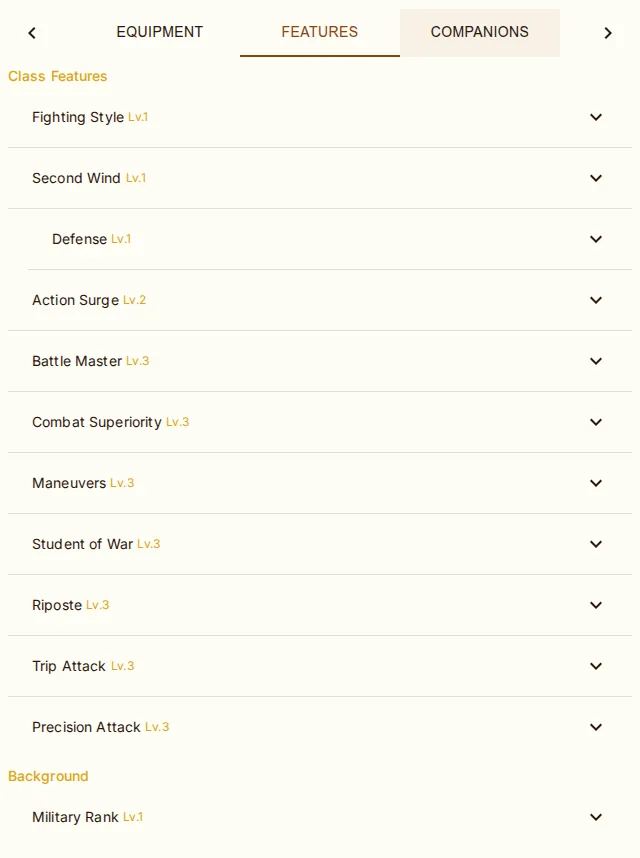
The Features tab displays all character traits and features grouped by source:
Racial Traits — automatically parsed from your race and subrace data (Darkvision, Dwarven Resilience, Keen Senses, etc.). Mechanical effects are applied: darkvision range, damage resistances, skill/weapon/armor proficiencies, speed bonuses, HP per level.
Class Features — features gained through leveling. Generic subclass placeholders (e.g., "Divine Domain feature") are resolved to show the actual subclass feature names.
Background — features from your chosen background.
Feats — feats from level-up, the starting-feat house rule, your race, or a DM. Each has a Remove (×) that takes its spells, resources and picked features with it, and feats with choices have a Reconfigure (⚙) that asks their questions again and rewrites the feat in place.
Each feature expands to show its full description. Features with mechanical effects display colored chips (AC, speed, HP/level, darkvision, resistances, etc.). Toggleable features (Rage, Bladesong) show a switch.
Edit Mode: Add & Remove Features
In edit mode, an Add Feature button appears at the top of the Features tab, and each feature shows a delete icon (X). The Grant Feature dialog has five tabs:
Class — pick features from any class. Defaults to the character's classes, with an option to show all. Filter by subclass and level.
Feats — search and grant any feat, with prerequisite display. Every feat applies its effects (see below).
Optional — Eldritch Invocations, Fighting Styles, Metamagic, or Pact Boons.
Special — DM-granted house-rule abilities.
Custom — create a free-form feature with name, description, source, level, and optional mechanical effects (AC, speed, HP/level, darkvision, extra attacks, resistances, immunities, vulnerabilities).
The same catalogue — plus spells, buffs, resources, companions, languages, and proficiencies — is behind the Grant button in the edit-mode toolbar (see Character Sheet) and the DM's Grant Feature page (see Campaigns). Removing a feat takes its spells, resources, and picked options with it.
Feat Configuration
Every feat you take now does what it says, whether from level-up, the Features tab, the creation wizard, or a DM grant. About 85 feats carry a hand-curated schema (Resilient, Skill Expert, Magic Initiate, Lucky, Mobile, Alert, Tough, the Dragonmarks, the epic boons, and so on); the rest derive their fixed bonuses and "+1 to an ability of your choice" prompts from the feat's own data. A feat that needs a decision opens a configuration dialog first. It captures your choices:
Ability bumps — pick which score(s) to increase from the feat's allowed list. Chip tooltips show what each ability covers.
Save proficiency — Resilient auto-grants proficiency in the chosen ability's save.
Skill proficiency / expertise — Skill Expert grants both. Chip tooltips show the ability + a one-line skill description.
Free mixed picks — Skilled lets you pick any 3 skills or tools.
Spell grants — Magic Initiate (2 cantrips + 1 1st-level from chosen class), Fey Touched (Misty Step + 1 1st-level enchant/divine), Shadow Touched (Invisibility + 1 1st-level illusion/necro). Spell chips tooltip shows level/school/concentration/first description line. A 1/long-rest tracked resource is auto-created for the 1st-level slot.
Resource grants — Lucky auto-creates a "Luck Points" resource (3, recovers on long rest). Uses that scale with proficiency bonus (Protective Wings, Fey Teleportation's free cast, Squire of Solamnia) are sized when the feat is taken.
Named spells — feats that name their spells (the Dragonmarks, Drow High Magic, Wood Elf Magic, Telepathic's Detect Thoughts…) add them without asking, each free casting tracked as a resource.
Picker feats — Eldritch Adept, Fighting Initiate, Martial Adept, and Metamagic Adept choose straight from the invocation, fighting-style, manoeuvre, or metamagic lists; Eldritch Adept honours the warlock prerequisite rule.
Free-form tools / languages / weapons — type to add (Weapon Master, Linguist, Skilled tool side). Tooltips list example values.
Static effects (Mobile +10 speed, Alert +5 initiative, Observant +5 passive perc/invest, Tough +2 HP/level)
are auto-applied without prompting. Dual Wielder's +1 AC applies only while two melee weapons are equipped. Combat toggle feats (GWM, Sharpshooter, Polearm Master, Crossbow Expert, Crusher, Slasher, Piercer)
show as conditional damage checkboxes in the weapon detail popover when you have the feat and the weapon matches.
For GWM / Sharpshooter the toggle is a single −5 to hit / +10 damage choice; when you tick it, the attack-roll dialog shows the
full breakdown (e.g. +2 (+3 prof, +4 STR, -5 Great Weapon Master)).
Death Saves
When a character drops to 0 HP, track death saving throws in the Death Saves popover under the HP card: 3 success / 3 failure circles, a Reset button, and a "Drop to 0 HP" button that sets HP to 0, clears temp HP, and applies any house rule effects (e.g., +1 exhaustion with the "Exhaustion on Drop" rule). Death saves reset on long rest or when HP is recovered. A sidebar card is also available from the layout editor.
Exhaustion
Two exhaustion systems are supported:
| System | Effects |
|---|---|
| Standard 2014 | 6 levels: disadvantage on checks, speed halved, disadvantage on attacks/saves, HP max halved, speed 0, death |
| Cumulative Penalty | -2 to all d20 rolls and -5 ft speed per level; level 6 = death |
Conditions
Track all 14 standard D&D 5e conditions (Blinded, Charmed, Deafened, Frightened, Grappled, Incapacitated, Invisible, Paralyzed, Petrified, Poisoned, Prone, Restrained, Stunned, Unconscious) from the Conditions dropdown on the Defenses card. Active conditions show as chips: hover one for what it costs you, click it for the full rules text, and use the × to clear it.
Defenses & Saving Throw Modifiers
Damage resistances, immunities, and vulnerabilities and condition immunities — gathered from race, features, buffs, and equipped items — live in the Resistances & Immunities box in the sidebar. The Defenses card beside AC lists the situational ones as chips naming their source (Heavy Armor Master only while in heavy armor, Rage only while raging, Uncanny Dodge, Evasion, Shield Master, War Caster, Magic Resistance…); hover for a summary, click for the full list with rules text.
When you roll a saving throw, the dialog lists the modifiers your character actually has but the app can't apply on its own — Shield Master's shield bonus on DEX saves, Aura of Protection's Charisma, advantage from War Caster, Magic Resistance, Dwarven Resilience, Gnome Cunning, Brave, Fey Ancestry, Danger Sense — each with its condition. Tick what applies to this roll; the app can't know what's being saved against.
Active conditions reach the dice too: Poisoned and Frightened name themselves as disadvantage on attacks and ability checks in the roll dialog, Blinded, Prone and Restrained on attacks. Darkvision, from race or an effect, is listed under Passive Perception as Senses. Natural armor (Lizardfolk, Draconic Resilience, Dragon Hide) competes with 10 + DEX and any Unarmored Defense; the best formula wins, and worn armor beats it only if higher. Bracers of Defense count only with no armor and no shield; the Defense fighting style only in armor.
Rest Dialog (Short & Long)
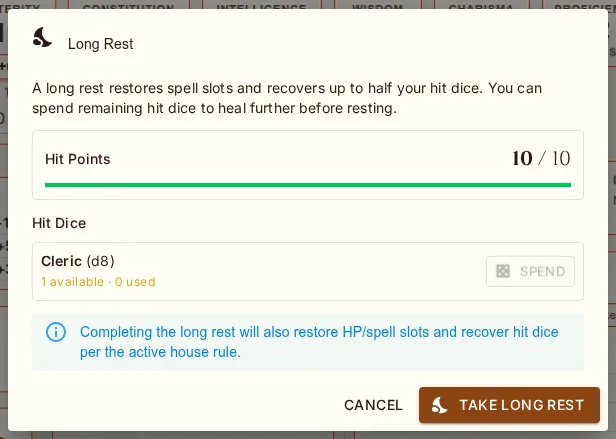
Both Short Rest and Long Rest in the top banner open a dialog where you can spend hit dice (rolled + CON modifier, capped at max HP) before confirming the rest. Cancel rolls back any HD spent. Confirming runs the rest logic (HP recovery, slot reset, exhaustion reduction, hit-die recovery) based on the active house rule:
| Rule | HP Recovery | Hit Dice | Other |
|---|---|---|---|
| Standard | Full HP restored | Recover half total (min 1) | Reset spell slots, -1 exhaustion, reset death saves |
| Gritty Realism | No auto HP | Recover ceil(level/2) | Reset spell slots, -1 exhaustion, reset death saves |
| Slow Natural Healing | No auto HP | Recover half total (min 1) | Reset spell slots, -1 exhaustion, reset death saves |
| Epic Heroism (1 hour) | Full HP restored | Recover half total (min 1) | Reset spell slots, -1 exhaustion, reset death saves |
Short Rest resets Warlock pact spell slots and resources tagged with short-rest recovery. Spend hit dice in the dialog for HP recovery as usual.