Rulesets
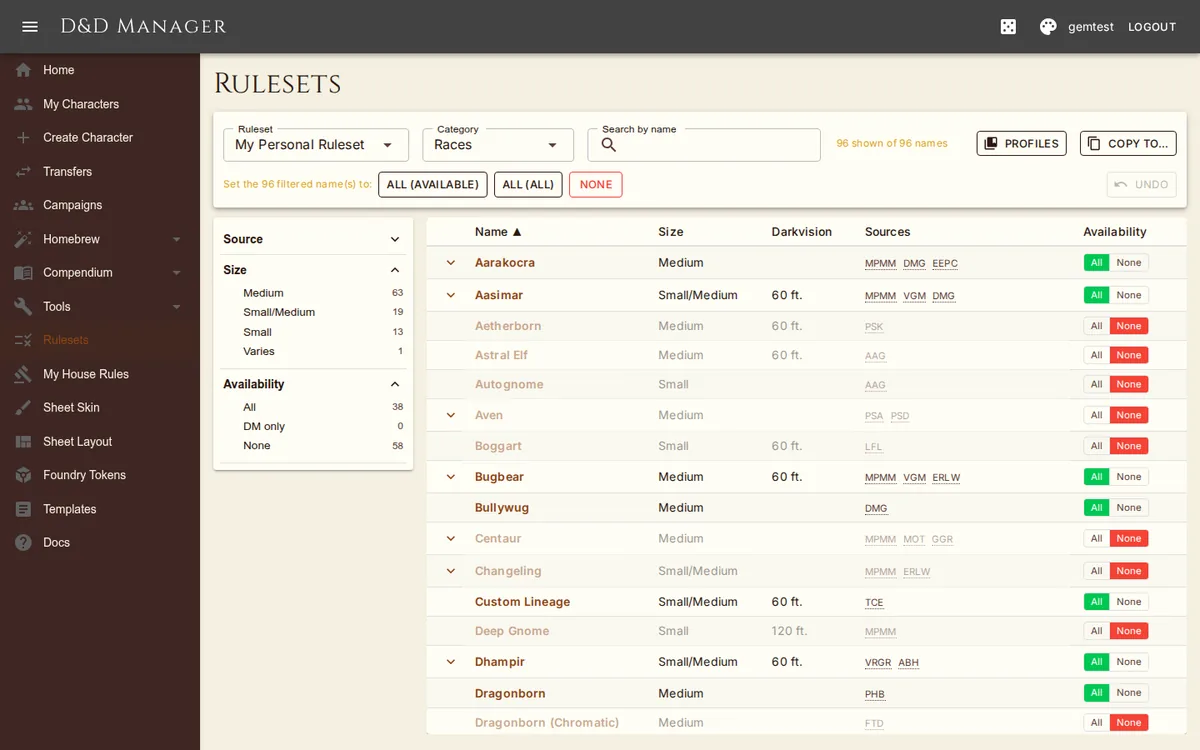
A ruleset is everything that decides what content a table can use: the enabled source
books, per-entry allow/deny overrides, the dedup priority, and the house rules. There is one for your
account (governing your campaignless characters) and one for each campaign you DM. The
Rulesets page in the nav (/rulesets) is the workbench for the first three;
house rules have their own editor (see House Rules).
The Workbench
Pick a ruleset at the top — your personal one, or any campaign you DM (a campaign's Manage Ruleset button lands here with it pre-selected). Then pick a category: Source Books, Races, Subraces, Classes, Subclasses, Backgrounds, Feats, Spells, Items (magical and non-magical), Languages, Optional Features. Each row is one name, and each name is set to one of:
All — available to everyone at the table.
DM — hidden from players; your own view is governed by the normal source filter.
None — banned for everyone, including you.
Expand a name that appears in several books to see each printing, view or Compare them side by side, and click Prefer to pin the printing players actually see. The bulk buttons (All, DM only, None, and "available" variants that touch only what can currently be offered) state their consequences before acting. Every click is undoable: Undo holds 25 steps, survives a refresh, and clears when you leave the page.
How Curation Resolves
Deny always wins. For everyone, DM included.
Inside a campaign, only the campaign's ruleset applies. A player's personal allow never adds anything back, and a DM's silence is not consent.
An explicit allow beats the book filter. You can admit a single race or spell from a book that is otherwise off.
Banning any printing of a name bans the name everywhere players pick from; an explicitly allowed printing is exempt and becomes the one shown.
Turning a book off keeps its overrides dormant; turning it back on revives them, and the toggle dialog lets you keep or reset each one.
Every player-facing picker — the creation wizard, level-up, the Grant Feature page, the sheet's add-language and add-item dialogs — resolves through these rules. The Compendium browsers keep per-printing precision so a DM can see exactly what each book says.
Copying & Profiles
Copy to… replaces another ruleset wholesale with this one — house rules, sources, and every override. Profiles are saved copies of a whole ruleset: save the current one under a name, apply a saved profile, export it as JSON, or import one from a file or a share code. Profiles replaced the older "source profiles" page.