Spells & Spellcasting
Spellcasting Info
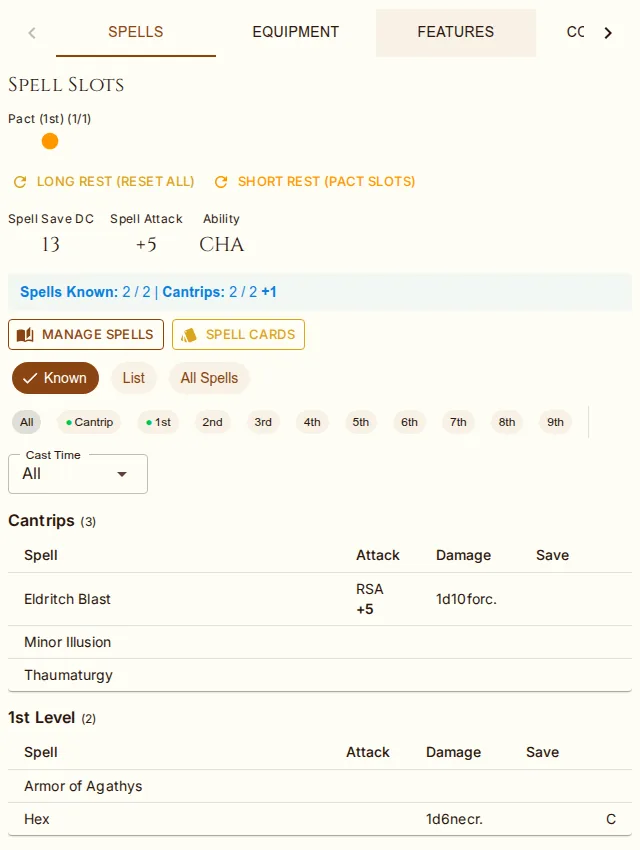
If your character has spellcasting (from class or subclass), the Spells tab displays:
Spell Save DC = 8 + Proficiency Bonus + Spellcasting Ability Modifier
Spell Attack Bonus = Proficiency Bonus + Spellcasting Ability Modifier
Spellcasting Ability (e.g., Intelligence for Wizards, Wisdom for Clerics)
Spell List & Filters
Spells are displayed in a table format with columns for attack, damage, and saving throw. A filter bar above the table lets you control which spells are shown:
View Mode — Prepared (prepared/always-prepared spells and cantrips for quick session reference), On List (all spells on your character, default), All Available (full class spell list — prepared casters only), Spellbook (Wizard only).
Level — multi-select chip filter (Cantrips, 1st–9th up to your max). Click chips to toggle multiple levels at once.
Casting Time — filter by Action, Bonus Action, Reaction, Ritual, or Other.
Prepared First — sorts prepared spells to the top of each level group.
Each level group header shows slot availability dots (filled = available, outline = expended) and an (available / max) count so you can see at a glance how many slots remain. A small scroll icon next to a spell name marks it as a ritual (cast without a slot if available time).
Each spell row shows:
Attack — RSA (ranged) or MSA (melee) spell attack with your spell attack bonus. Hover for breakdown.
Damage — base damage dice and type, parsed from the spell description. Cantrips scale with total character level. Feature bonuses auto-detected: Agonizing Blast (+CHA to Eldritch Blast), Empowered Evocation (+INT to evocation spells). Hover for breakdown.
Save — saving throw ability (DEX, WIS, etc.) with half-damage indicator.
Flags — C (concentration), R (ritual).
Click any spell name to open a detail panel showing full description, casting time, range, components, duration, damage scaling, source reference, and a Roll Spell Attack button.
Spell Slots
Spell slots are displayed as circles for each slot level — filled means available, outline means expended — with an (available / max) count in the header. Click a circle to spend or recover one slot. Slots are automatically calculated based on your class levels and caster progression. Multiclass characters use the multiclass spell slot table.
Long Rest resets all spell slots
Short Rest resets Warlock pact slots (and short-rest resources and item charges, but no other slots)
Spells From Feats, Races, and Items
Not every spell on your list comes from a class. Feats that name their spells — Magic Initiate, Fey Touched, Shadow Touched, the Dragonmarks, and the other curated feats that grant a fixed spell — add them when the feat is taken, with a once-per-rest resource for each free casting. Racial spells arrive at creation (a Tiefling's Thaumaturgy, a High Elf's chosen wizard cantrip) or at the level that unlocks them. Magic items' attached spells appear while the item is equipped, and an item that adds to spell attacks (a Wand of the War Mage) feeds the Attack column while equipped and, if required, attuned. Revoking the feat, or unequipping the item, takes the spells away again. Each row's source is shown in the Manage Spells dialog.
Managing Spells
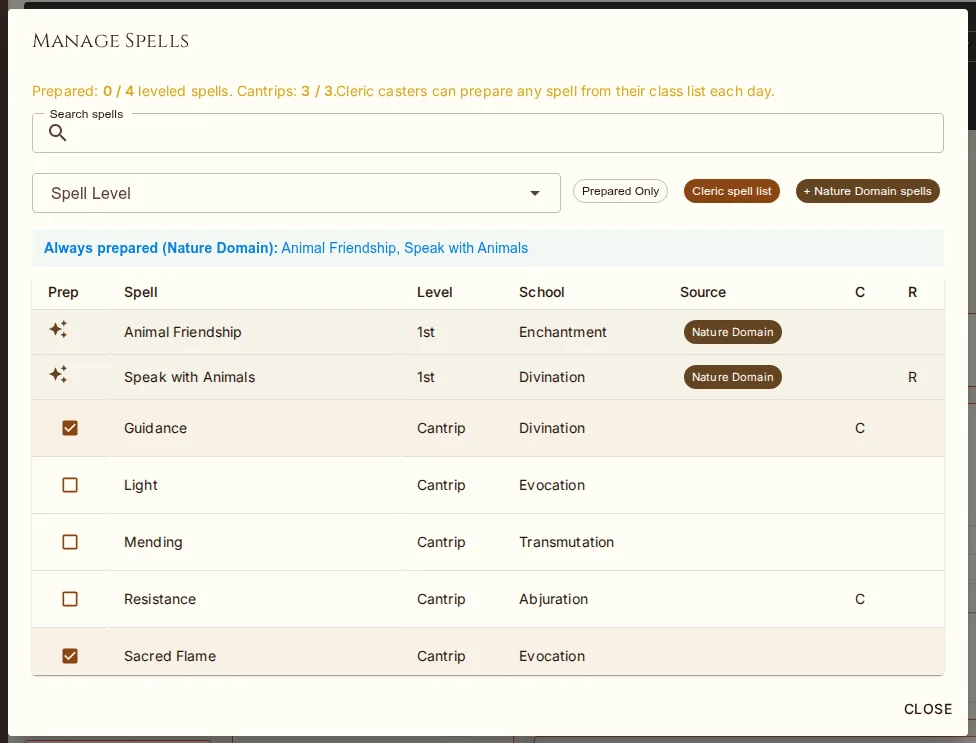
Click Manage Spells (or Manage Spellbook for Wizards) to open the spell management dialog. The dialog adapts to your class type:
Known-spell casters (Bard, Sorcerer, Ranger, Warlock): Add/remove spells from your known list. Shows max known count.
Prepared casters (Cleric, Druid, Paladin, Artificer): Browse your entire class spell list. Toggle the Prepared checkbox to select your daily preparations. Shows "Prepared: X / Y" with formula (e.g., WIS mod + Cleric level).
Wizard Spellbook: Two-tab layout. The Spellbook tab shows only spells in your personal spellbook with Prepared toggles. The Add to Spellbook tab shows the full Wizard spell list for copying new entries (costs 2 hours + 50 gp per spell level in-game). Ritual spells can be cast from the book without preparing.
All modes include search by name, filter by spell level, subclass spell integration, and cantrip count (known / max). Click any spell name to view its full description, casting time, range, components, and duration.
Subclass Spells
Some subclasses grant bonus spells that are always prepared and don't count against your
spell limit (e.g., Cleric domain spells, Paladin oath spells). These appear automatically
on the Spells tab with a star icon and "Always prepared (subclass)" tooltip
instead of a preparation checkbox. They cannot be toggled off or removed. The system
automatically parses subclass additionalSpells data to determine which spells
are granted as always-prepared, bonus-known, or expanded list options based on your class level. Where
the data comes in named groups (Circle of the Land's terrains, Divine Soul's affinities) only the group
you chose applies. Eldritch Knights and Arcane Tricksters cast from the wizard list with Intelligence
and the third-caster slot table; the Spells tab and level-up treat them like any other caster.
Preparing Spells
For classes that prepare spells (Clerics, Druids, Paladins, Wizards, Artificers), toggle the preparation checkbox next to each spell. Changes save immediately — no need to enter edit mode. The spell tab header shows your prepared count with the calculation formula. Subclass always-prepared spells cannot be toggled off. Use the All Available view to browse your full class spell list and prepare new spells directly — checking the box adds the spell to your list and marks it prepared in one step. Unchecking a spell you just added will remove it entirely, reverting to its original state.
Wizard Level-Up: Wizards gain 2 free spells per level-up (added to spellbook, not auto-prepared). This is controlled by the Wizard Spellbook Learning house rule — DMs can disable it for campaigns where spellbook contents are managed manually.