Character Sheet
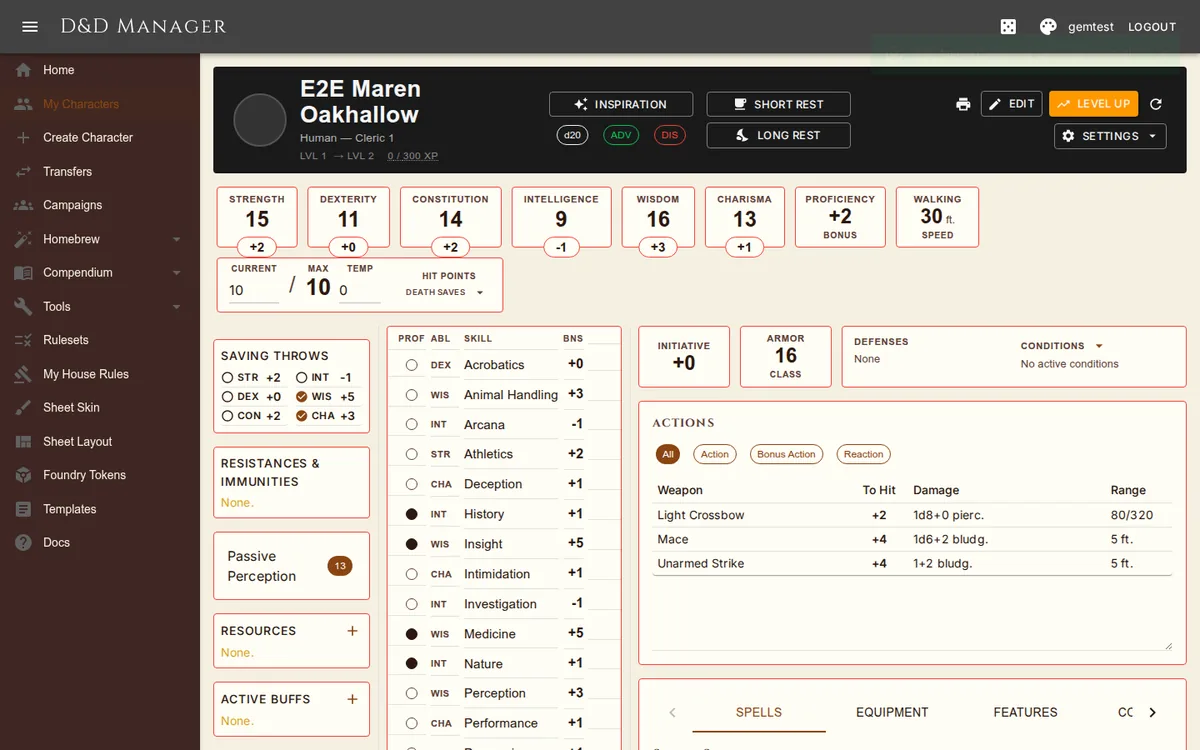
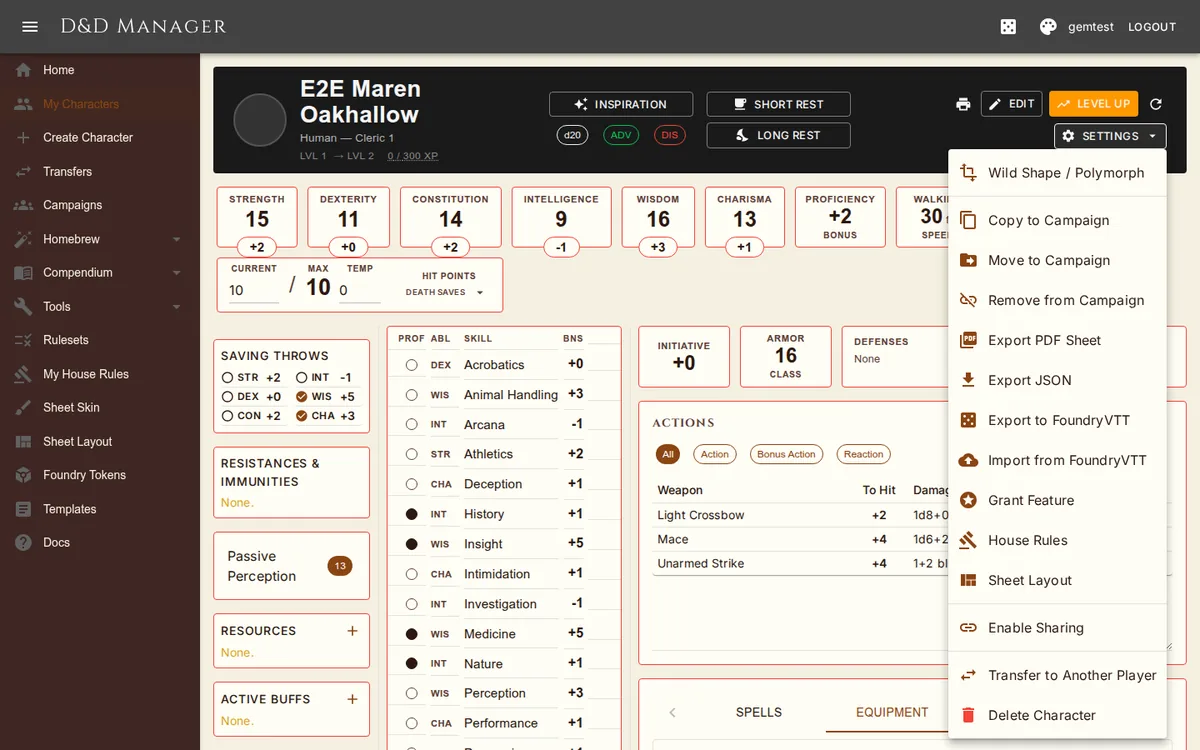
The character sheet is a three-column layout under a dark banner: a sidebar, a middle column (skills and tools), and a right column (initiative, AC, defenses, actions, and the tabbed panel). Sections can be reordered or hidden via Sheet Layout, and the columns can be resized by dragging the thin dividers between them (double-click a divider to reset); the Item column of the Equipment table has its own drag handle. Widths save into this character's layout if it has one, otherwise into your account default.
Delta Numeric Fields
All numeric fields (HP, TempHP, ability scores, currency, XP, equipment quantity) support delta input:
type +5 or -7 to add or subtract from the current value, or type a plain number to set directly.
Press Enter or click away to commit. HP, TempHP, XP, currency, and quantities save immediately; base ability scores
are edited in place in edit mode — the ability box itself becomes the field.
Top Banner

The dark top banner is split into three columns. Left: portrait, name, race/class subtitle, level/XP line. Center (2x2 grid): Inspiration button | Short Rest button on the top row; d20 / ADV / DIS chips | Long Rest button on the bottom. The d20 chip rolls a plain d20 (using the current advantage/disadvantage mode if any). The ADV and DIS chips toggle that mode (filled = active). Right: Print (downloads the PDF sheet), then Edit and Level Up (hidden at level 20), a Refresh icon, and the Settings menu. In edit mode the toolbar becomes Save / Cancel / Grant. Portrait: click it to view full-size in a lightbox overlay (click anywhere to dismiss). XP: click the "X / Y XP" value to open a popover with a delta-input field plus quick-add buttons (+25, +100, +250, +500, +1000). Stat row below the banner: ability score boxes (click to roll a check; in edit mode they edit the base score), Proficiency, Walking Speed, and the HP card (Current/Max/Temp HP all editable with delta input). Under the "Hit Points" label is a Death Saves button that opens a popover with the success/failure circles, Reset, and Drop to 0 HP actions.
Defenses card (beside AC): situational defenses as chips naming their source — Heavy Armor Master only while in heavy armor, Rage only while raging, Uncanny Dodge, Evasion, Shield Master, War Caster, Magic Resistance, Brave, Gnome Cunning, Unarmored Defense — up to six, with "+N" for the rest; hover for a summary, click for the full list with rules text. The Conditions dropdown on the same card adds any of the 14 standard conditions; active ones show as chips (hover for what it costs you, click for the full rules, × to clear). Damage resistances, immunities, vulnerabilities and condition immunities live in the sidebar's Resistances & Immunities box.
Grant
In edit mode a Grant button joins Save and Cancel. It opens the same catalogue the DM's Grant Feature page uses — features, feats, spells, buffs, resources, companions, languages, proficiencies — with a Give / Take back toggle, a kind picker, search, and an "Ignore curation" switch for the curated kinds. Each row commits the moment you click it and writes a snapshot you can roll back from History; Cancel does not undo a grant. Feats with choices ask their questions first. Available to the owner and the campaign's DM.
Live Updates
If someone else saves this character — a DM granting something, another tab — the sheet reloads itself. If you are mid-edit, a notice asks you to finish or cancel first, and Save refuses rather than overwriting if the character changed underneath you. Your own clicks never trigger the notice. The refresh icon in the banner reloads on demand.
Left Sidebar
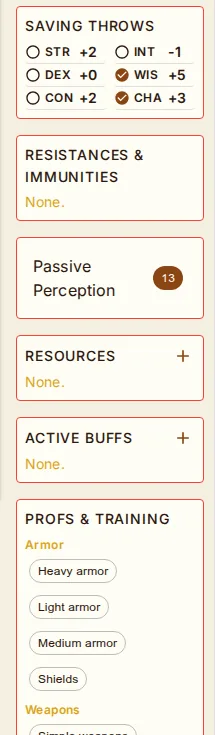
Default order: Saving Throws → Resistances & Immunities → Passive Perception → Resources → Active Buffs → Profs & Training → … → Campaign/House Rules. All sections are configurable via the Sheet Layout editor.
| Section | Description |
|---|---|
| Saving Throws | Two columns reading down — STR/DEX/CON on the left, INT/WIS/CHA on the right — folding to one when the sidebar is narrow. Click a row to roll; the roll dialog lists the situational modifiers your character actually has (Shield Master's shield bonus on DEX saves, Aura of Protection, advantage from War Caster, Magic Resistance, Dwarven Resilience, Gnome Cunning, Brave, Fey Ancestry, Danger Sense) so you can tick what applies. In edit mode, click the proficiency dot to toggle. |
| Resistances & Immunities | Damage resistances, immunities, vulnerabilities and condition immunities gathered from race, features, buffs, and equipped items, each naming its source. |
| Passive Perception | 10 + WIS mod + Perception proficiency bonus (+ feat bonuses like Observant) |
| Exhaustion | Only renders when level > 0 or in edit mode. Level 0-6 with +/- controls and effect descriptions per house rule. |
| Resources | Tracked resources (Rage, Ki, Sorcery Points, Bardic Inspiration, Luck Points from feats, racial spell uses, etc.) — displays available/max. Click − to spend one, + to recover one. Click the count text to edit max uses. Remove (X) only renders in edit mode. Power button appears for resources whose name matches a toggleable feature (Rage, Wild Shape, Bladesong, etc.); one click activates (consumes a use AND flips the feature on) and another deactivates (no refund, RAW). Stance toggles (Reckless Attack, Sneak Attack, Hide in Plain Sight) appear as toggle-only rows with no count. Hover any row for name, source, recovery, die type, current/max, and the linked feature's description. (see Class Resources) |
| Active Buffs | Temporary spell/potion/item effects with duration and concentration tracking (see Active Buffs) |
| Profs & Training | Armor, Weapons, Tools, Languages. In edit mode add/remove via close-chip + add dropdown, and click a tool to toggle expertise. |
| Campaign Rules / House Rules | Summary of active non-RAW rules, titled Campaign Rules when the character is in a campaign; the pencil opens the per-character editor. |
| Also available from the layout editor: Death Saves (also in the HP card popover), Conditions (also on the Defenses card), Inspiration (also in the banner), Currency (also in Equipment), Hit Dice, and Rest Actions. Turn off whichever duplicates you don't want. | |
Skills and Tools
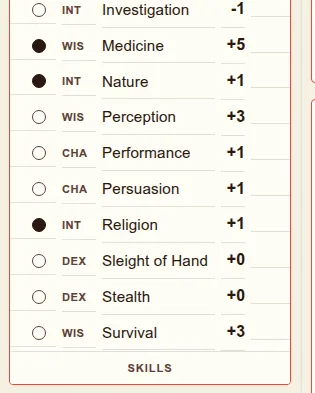
The Skills card's columns read Prof / Abl / Skill / Bns. The proficiency dot is filled for proficient and gold-cored for expertise; hover a skill name for what it covers, click a row to roll. The Tools card sits directly below with a Prof / Tool / Bonus layout — click a row to roll a tool check with proficiency added (no ability modifier, since tool checks use whichever ability is contextual); in edit mode, click to toggle expertise, shown with a ★.
Right Panel Tabs
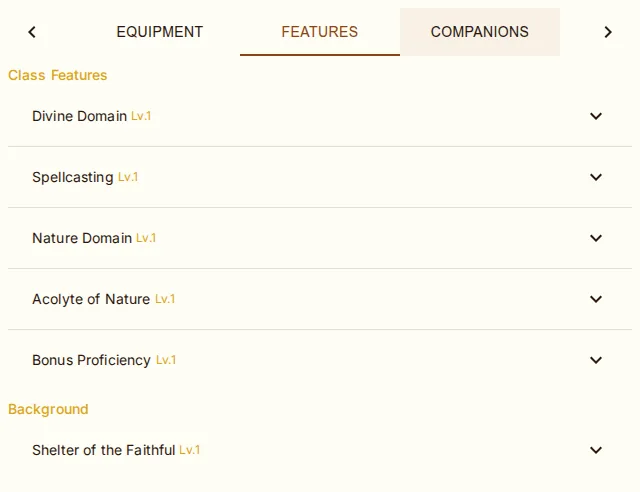
| Tab | Contents |
|---|---|
| Initiative, AC, the Defenses card, and Actions (the attacks table) are fixed cards above the tabbed panel, which contains: | |
| Spells | Spell slots (circles filled when available, outlined when expended; click any circle to ±1; per-level header shows "(available/max)"), spellcasting info, spell list with view-mode filter (see Spells) |
| Equipment | Full inventory with weight, attunement, charges, potion Use buttons, encumbrance tracking, and the Currency block (see Equipment) |
| Features | Traits and features grouped by source (racial, class, background, feats). In edit mode: add features from any source, remove features |
| Companions | Familiars, beast companions, summoned creatures, mounts. Click Add Companion to pick from 6 presets (Owl, Cat, Hawk, Raven, Wolf, Warhorse) or build custom. Track HP and dismiss separately |
| History | Version timeline with rollback (see Versioning) |
| Notes | Personality, appearance, allies/enemies, backstory |
Action Buttons
Edit / Save / Cancel / Grant — edit mode covers base scores, skills, saves, proficiencies, languages, and text fields. Those changes are held in memory until Save (creates snapshot) or Cancel (reverts). Grants commit immediately.
Level Up — advance your character (see Leveling Up)
Print (printer icon) — download the printable PDF character sheet (a flowing two-or-more-page sheet: abilities, saves, skills, combat, attacks, proficiencies, gear and coins on page 1; features with their text, the spell table with slot boxes, and personality after; nothing empty is printed)
Settings menu (⚙ Settings ▾): Wild Shape/Polymorph, Grant Feature, House Rules (per-character editor), Sheet Layout (per-character override), Copy/Move to Campaign, Remove from Campaign (only when in a campaign), Export (JSON, PDF, FoundryVTT), Import from FoundryVTT, Sharing, Transfer to Another Player (owner only), Delete Character
Sharing
Characters can be shared via public links that anyone can view without logging in. See Character Sharing for full details. From the Settings menu, click Enable Sharing to generate a share token, then Copy Share Link to copy the public URL to your clipboard.