Equipment & Inventory
Inventory Overview
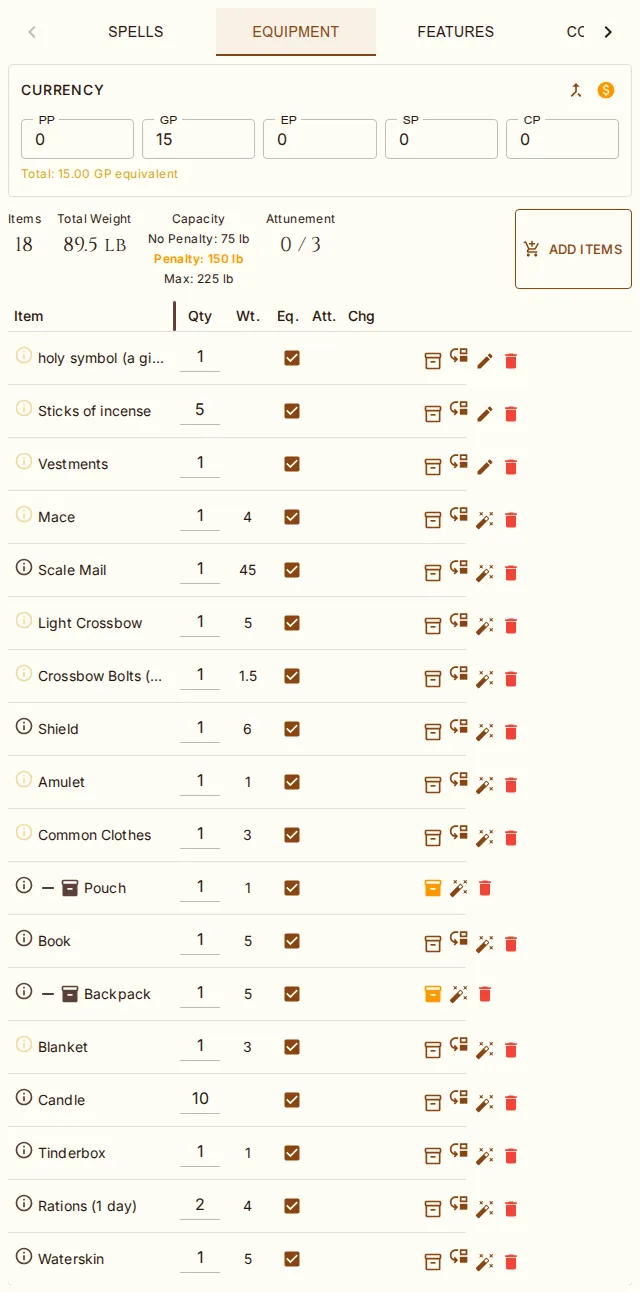
The Equipment tab shows a summary bar with item count, total weight, carrying capacity, and attunement slots used (current / max).
Adding Items
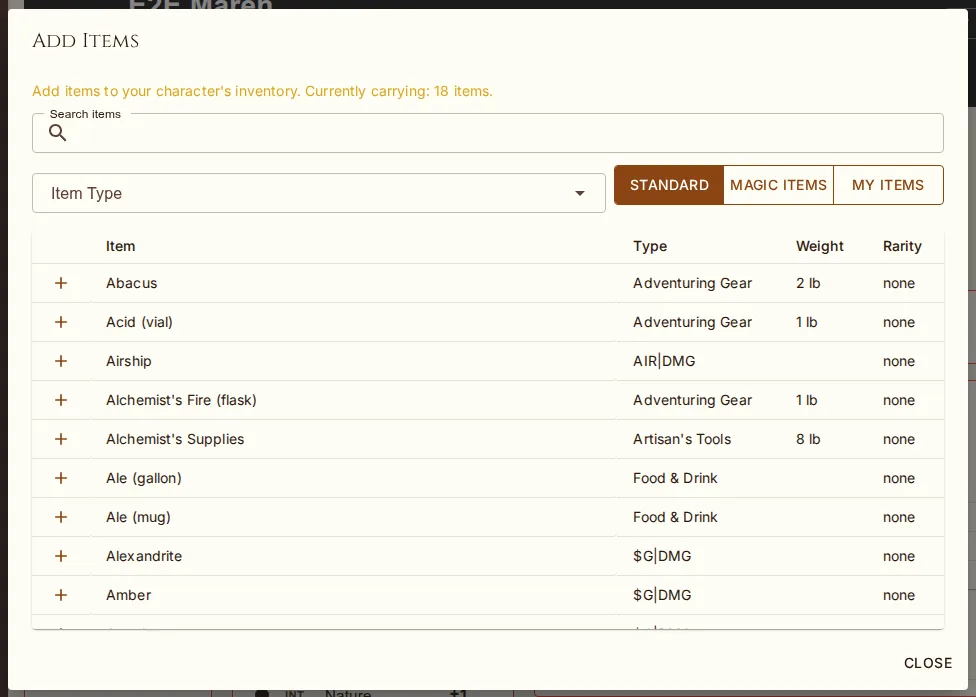
Click Add Items to open the item browser. Search by name or filter by item type, and switch between three views: Standard (mundane gear), Magic Items (named magic items and generated variants such as "+1 Longsword" or "Flame Tongue Greatsword"), and My Items (your custom library). Click the + button to add an item to your inventory. The lists show their first 500 rows and say so; type in the search box to reach the rest. A new item starts equipped — that is what carried means here — except a second suit of armor or a second shield, which arrives unequipped rather than displacing what is worn; equipping one later takes the other off. Wands, staffs and rods arrive fully charged. Attuning is still a deliberate click, and the character's attunement limit (3, or the house rule's number) is enforced.
Adventuring packs (Burglar's, Explorer's, Diplomat's, Dungeoneer's, Entertainer's, Monster Hunter's, Priest's, Scholar's) are flattened on add: instead of giving you the pack as a single line, the system adds each constituent item as its own top-level row. Quantities merge with anything you already own — adding an Explorer's Pack while you already have a Crowbar just bumps the Crowbar quantity. Special non-item entries like "10 feet of string" are dropped (logged for the admin). This applies during character creation and from the Manage Items dialog.
Item Descriptions (Tooltips)
Every inventory row has an outlined info (ⓘ) icon. Hover for about a second to see the item's full description in a tooltip — rendered with formatted D&D content, capped at 360×400 px with scroll — or click the icon to expand the description inline under the row. Items without a description show the icon dimmed and the tooltip reads "No description available." Long item names ellipse rather than wrap; hover for the full name.
Quantity & Quick Edits
Quantity is editable on every inventory row (top-level and inside containers) without
entering edit mode — type a value, or use delta input (+5, -1) to add or subtract.
Saves immediately. The same applies to Currency: all five coin types (PP, GP, EP, SP, CP)
are always shown and each is directly editable when you have edit permission, no edit-mode toggle required.
Managing Items
In edit mode, the item table lets you:
Toggle equipped status (equipped items appear in the Attacks tab if they have weapon stats; only equipped items count toward carry weight — see Encumbrance below)
Toggle attuned status (counter shown in summary; the slot count is configurable via house rule)
Mark as container / Unmark as container via the Inventory2 icon (warning-colored when on) for items the auto-detector misses. Cannot unmark a container that still has children.
Move to container via the row menu (touch/keyboard fallback for drag-and-drop)
Eject (move out of current container back to top level)
Charges on items that have them show as a compact current/max counter with spend (−), restore (+), and recharge buttons — usable without edit mode
Use (flask icon) on potions — see Potions below
Delete commits immediately with a confirmation dialog (no Save step needed). Deleting a container that still contains items cascade-deletes the children — the confirmation calls out the count so you know what's going.
Containers
Items with carrying capacity in the source data (Backpack, Pouch, Sack, Quiver, Case, Bag of Holding, Heward's Handy Haversack, etc.) are auto-flagged as containers when added. Each container row has a fold/unfold button next to the bag icon — click + to collapse and − to expand. When collapsed, the row shows a small "+N" note beside the container name, and drop targets still work on the collapsed row. Fold state persists on the character — refresh the sheet and your containers stay in whichever state you left them.
Drag and Drop
Drag any inventory row by the grab bar in its name column to reorder or move items:
Drop an item onto another item in the same zone to insert it just before that item (reorder)
Drop an item onto a container row to put it inside that container
Container cycle prevention: you can't put a container inside itself or any of its descendants
Touch devices don't fire HTML5 drag-and-drop events — use the row menu's Move to container and Eject commands instead.
Magic Items
Magic items display their variant name (e.g., "+1 Longsword") and rarity. When a magic variant template is applied, the item's display name, rarity, and any weapon bonuses are automatically updated. Weapon bonuses feed the Attacks table's to-hit and damage; armor and shield bonuses feed AC.
Magic items do more than add to hit. While an item is equipped — and attuned, if it asks for attunement — its passive effects reach the sheet: damage resistances, immunities and vulnerabilities, condition immunities, ability bonuses (Belt of Dwarvenkind) or fixed scores (Gauntlets of Ogre Power set STR to 19), bonuses to all saves or to one ability's saves (an Ioun Stone of Self-Preservation on INT), spell-attack bonuses, darkvision, speeds, languages, and proficiencies. Generated variants (Armor of Fire Resistance, a +1 Shield) carry their template's defences too. An item sitting unequipped in your pack does nothing, by design. The Stat Audit dialog shows each item's contribution, and the Resistances & Immunities box names the source of every defence.
Effects that need an action, a charge, or a situation ("while raging", "against undead") stay as text
on the item — read the description. Every magic item was audited against the engine in August 2026;
the remaining judgment calls are listed in EFFECTS-AUDIT.md.
Potions
Potions show a flask Use button on their row. Click it to drink one: the dialog reads the healing dice out of the potion's description and offers whatever the campaign's Healing Potions house rule allows — roll it, take the maximum (a full action under the bonus-action-or-max rule), or both. Healing is capped at your max HP and one potion leaves your inventory. Potions with no automatic effect (Potion of Flying, Potion of Poison) are still consumed; the effect is yours and the DM's to apply.
Encumbrance
Carrying capacity depends on the campaign's encumbrance house rule:
| Rule | Effect |
|---|---|
| None | No weight limit |
| Simple Threshold (RAW) | Maximum carry weight = STR x 15 lbs |
| Variant Encumbrance | STR x 5 = encumbered (-10 ft speed); STR x 10 = heavily encumbered (-20 ft speed + disadvantage); STR x 15 = over capacity |
The Capacity stat box on the Equipment tab displays all three thresholds — No Penalty (STR×5), Penalty (STR×10), and Max (STR×15) — and highlights the row matching your current carried weight (green / yellow / red).
What counts toward weight: only items that are equipped, plus anything inside an equipped container (transitively). Items in unequipped bags or loose top-level items you haven't toggled equipped don't count. To track encumbrance for things in your Backpack, mark the Backpack as equipped. Bag of Holding still zeros out its contents; the bag's own empty weight still counts when equipped. The Items stat says how many rows are "not carried" so the total is never a mystery.
Heavy armor: wearing armor whose Strength requirement you don't meet (chain mail 13, plate 15) costs 10 feet of walking speed, on the sheet and in the API.