Sheet Layout
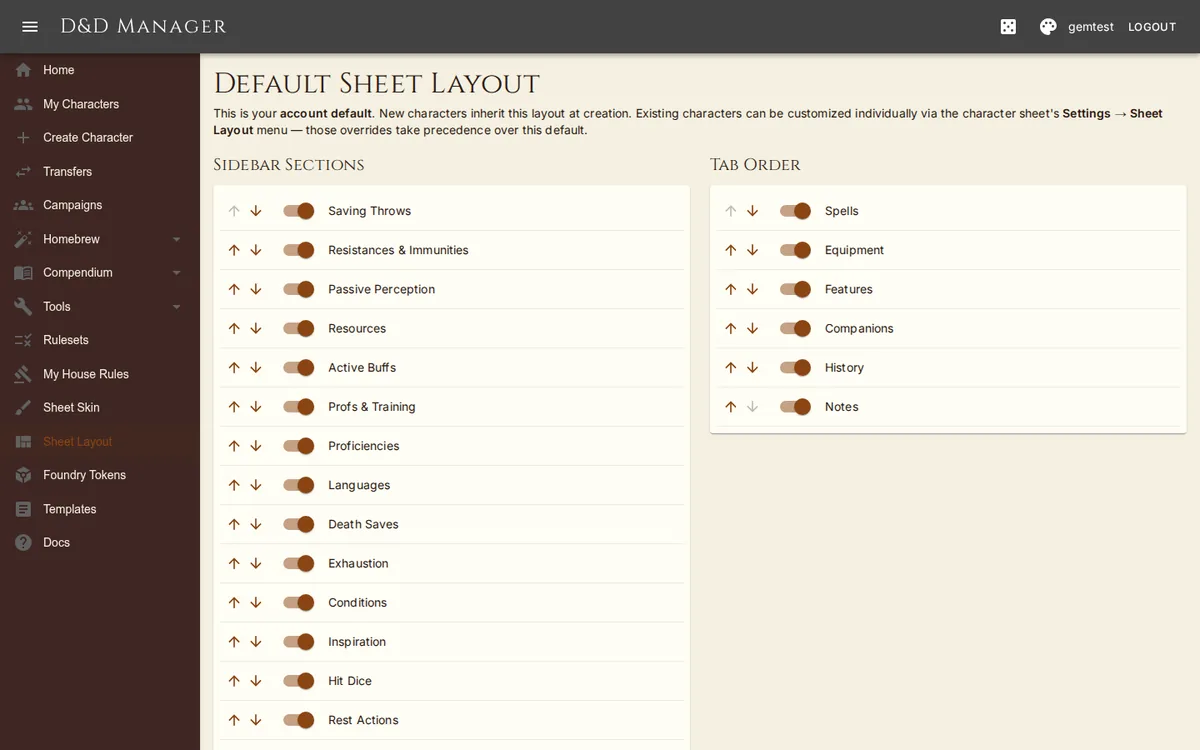
Sheet Layout is layered — mirrors the layered house-rules model:
Account default at /settings/layout. New characters snapshot this layout at creation. The page heading says "Default Sheet Layout".
Per-character override at /characters/{id}/layout (also linked from the character sheet's ⚙ Settings menu → Sheet Layout). Customizing here only affects that one character.
The character sheet picks the first non-null layout: character override → user default → seeded system default.
Sidebar Sections
For each section: move up / down with arrow buttons, or toggle visibility with the switch. The sections are Saving Throws, Resistances & Immunities, Passive Perception, Resources, Active Buffs, Profs & Training, Proficiencies, Languages, Death Saves, Exhaustion, Conditions, Inspiration, Hit Dice, Rest Actions, Campaign Rules, and Currency. (Ability scores are edited in place on the sheet and have no card.)
Column Widths
On the sheet itself, drag the two dividers between the columns to resize them, and drag the divider on the Equipment tab's Item column. Widths save as soon as you let go — into this character's own layout if it has one, otherwise into your account default, so a character with its own layout never rewrites everyone else's. Double-click a divider to hand that column back its default share. Columns clamp to 180–640 px (the item name column to 120–700 px). Dividers are hidden on narrow screens.
Tab Order
The right panel has 6 tabs (Spells, Equipment, Features, Companions, History, Notes). Reorder them or hide tabs you don't use. The configured order actually drives rendering — the sheet wraps its panels in a loop over the configured tab list.
Controls
Save — persists the current layout (to AppUser on /settings/layout, or to the Character on the per-character editor).
Reset to My Default (per-character only) — clears the override so the character falls back to your account default.
Reset to Defaults (account page) / Reset to System Default (per-character) — restores the seeded section order and visibility.