Custom Items
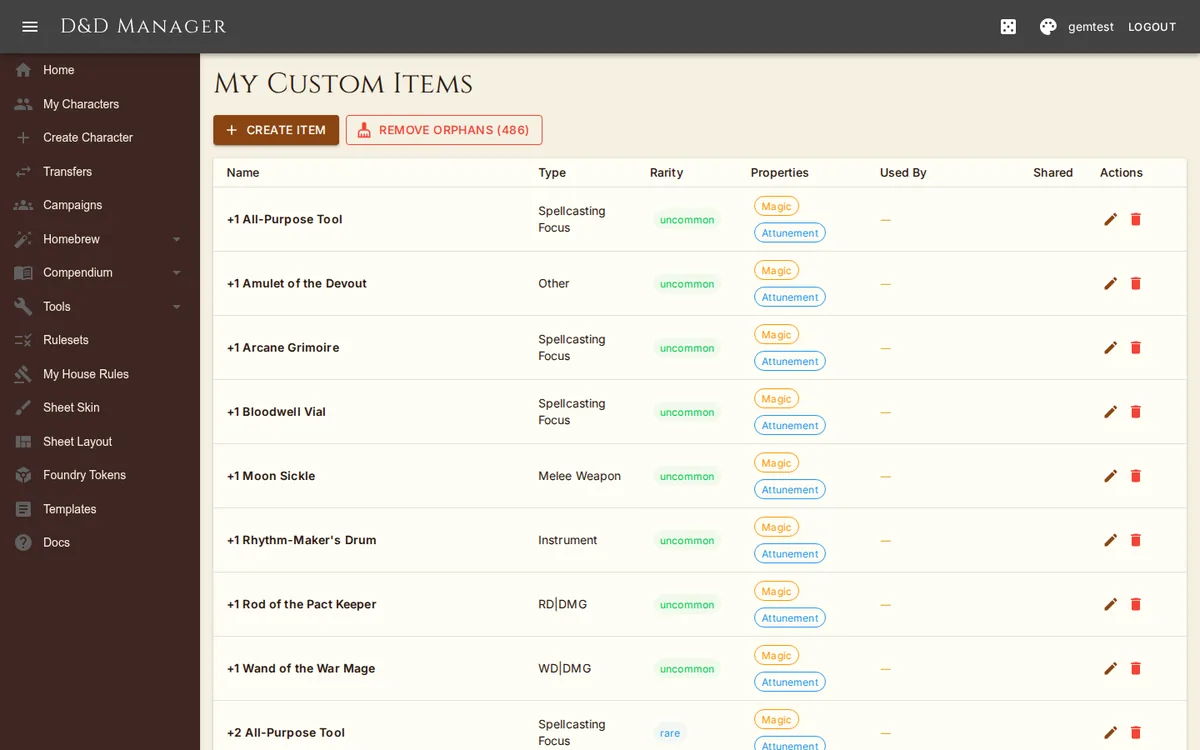
Create custom magic items at Settings > My Items.
Item Creator
The item creator dialog has six tabs:
Basic — Name, type (weapon/armor/wand/ring/etc.), rarity, weight, value, magic/wondrous/attunement/masterwork/shared flags
Combat — Weapon category, damage, damage type, range (weapons); AC, DEX max, stealth disadvantage (armor)
Bonuses — Weapon bonus, AC bonus, spell attack bonus, saving throw bonus, damage defences (Resistant / Immune / Vulnerable per type), and the Advanced effects (JSON) editor for everything the pickers can't say — all applied while the item is equipped, and attuned if it requires attunement
Charges — Max charges, recharge amount (dice expression like "1d6+1" or "all"), recharge trigger (dawn/dusk/long rest/short rest/weekly/manual)
Spells — Attached spells, one per line; append x3 to a name to make it cost 3 charges per cast. They appear in the Spells tab's Item Spells section while the item is equipped (and attuned, when required) — even on characters with no spellcasting of their own. Click a name for the full spell; the wand button casts it, spending the charge cost.
Description — Item description text
Advanced Effects & Transferable Bonuses
The Advanced effects (JSON) box on the Bonuses tab holds the item's full effects blob — the same schema class features and buffs use (ability bonuses and overrides, conditional weapon damage, granted speeds, advantage, and more). It's shown pretty-printed, can be resized by dragging its corner, survives every save, and refuses invalid JSON rather than losing your work. The defence pickers below it override their own three keys. Every available key is catalogued in the Effects Reference appendix.
Transferable bonuses are a pool of points the wearer re-routes between uses — the Defender sword's +3 split between attack and AC, or a Ring of Shifting moving its essence between ability scores:
| Example | JSON |
|---|---|
| Defender (+3 weapon, may guard) | {"transferable":{"targets":["attack","ac"],"label":"Defender"}} — no amount means "the weapon's own magic bonus" |
| Ring of Shifting (2 essence into a stat) | {"transferable":{"amount":2,"targets":["str","dex","con","int","wis","cha"],"label":"Essence"}} |
Valid targets:
| Target | What the points do there | Where you shift them |
|---|---|---|
attack | The weapon's own attack and damage bonus — the home of any points not shifted away (weapon items only) | Weapon detail dialog's split control |
ac | +N Armor Class while the item is equipped (held) | Weapon detail dialog's split control |
str dex con int wis cha | +N to that ability score — saves, skills, and attacks all follow | Swap-icon menu on the item's equipment row (single mode) or the stepper dialog (split mode) |
speedBonus darkvision initiativeBonus passivePerceptionBonus passiveInvestigationBonus savingThrowBonusFlat spellAttackBonusFlat | +N (× the target's rate — e.g. 30 ft of darkvision per point) to that number | Same menu or dialog |
Shifting commits immediately with no version snapshot — it's play-state, like spending a spell slot. Timing rules ("adjust on your first attack each turn", "change after a long rest") are the table's to keep; the sheet reflects the current split. Points apply only while the item is equipped, and attuned when it requires attunement.
Masterwork Weapons
Masterwork is a homebrew property that grants +1 to attack rolls only (not damage). The weapon is not considered magical for purposes of overcoming damage resistance. Enable the "Masterwork" checkbox when creating a weapon item.
Adding to Characters
From the character sheet's Equipment tab, click Add Items. A toggle switches between three views:
- Standard — Mundane items only (rarity "none"). Backpacks, rope, torches, basic weapons and armor, adventuring gear.
- Magic Items — Named magic items from the DMG and other source books (Bag of Holding, Holy Avenger, Cloak of Protection, etc.) plus generator-produced variants (+1 Longsword, +2 Trident). All sorted alphabetically together.
- My Items — Your homebrew library plus any UserItems shared by other users.
Each view supports a search box and an item-type filter (melee weapon, light armor, scroll, etc.). Lists cap at 500 entries — narrow with search or type filter for big libraries.
Editing From the Sheet
A pencil icon on a homebrew item row opens the creator prefilled. On a built-in item the wand icon Convert to Custom clones it into your library so you can edit it; the same two buttons sit in the weapon detail dialog. If the item is also held by another of your characters, the dialog warns you and offers Edit only this character's copy.
Library Maintenance
The My Items table has a Used By column listing the characters holding each item (click a chip to open that sheet). Merge Duplicates collapses items that share a name into one, re-pointing every character at the survivor. Remove Orphans deletes items no character holds. Deleting an item another of your characters still carries asks whether to remove it from them too; another user's references are never touched.