Class Resources
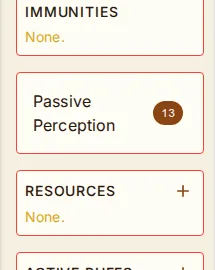
Track per-rest class resources like Ki Points, Sorcery Points, Rage, and more in the Resources section on the character sheet sidebar.
Adding Resources
Click the + button and choose from 11 quick presets (Ki Points, Sorcery Points, Bardic Inspiration, Rage, Channel Divinity, Wild Shape, Action Surge, Second Wind, Indomitable, Lay on Hands, Arcane Recovery) or create a custom resource with a name, max uses, recovery type, and optional die type.
Using Resources
Each resource row shows available/max with − and + buttons. − spends one (disabled when none remaining); + recovers one (disabled when at max). Click the count text to open the Edit Max Uses dialog and adjust the maximum inline (e.g. bumping Rage from 2 to 3 at level 3). Remove (X) only appears in edit mode to prevent accidental deletion.
Activate / Deactivate Toggleable Features
When a resource's name matches a toggleable feature (Rage, Wild Shape, Bladesong, Patient Defense, Flurry of Blows, Channel Divinity, Sacred Weapon,
Vow of Enmity, Hex Warrior, Hunter's Mark, Hexblade's Curse, etc.), a power button appears on the row.
Click it to activate — one click consumes a use AND flips IsActive=true on the linked feature.
Click again to deactivate — flips IsActive=false but does not refund the use (matches RAW: ending Rage early doesn't give it back).
Active rows show a green-tinted background with a "● ACTIVE" label; the activate button is disabled
when no uses remain. Hover any row for a tooltip with the resource's name, source, recovery, die type,
current/max, and the linked feature's description.
Stance Toggles
Some toggleable features have no daily resource — they're stances you opt into per-attack or per-turn. Reckless Attack, Sneak Attack, and Hide in Plain Sight render in the Resources panel as toggle-only rows (just the name + power button, no count or +/-). Click to engage; click again to end. No use consumed.
Rest Recovery
Resources recover automatically when you take a rest via the rest buttons on the character sheet. Long rest recovers both long-rest and short-rest resources. Short rest recovers only short-rest resources. The rest summary shows how many resources were recovered.