Dice Roller
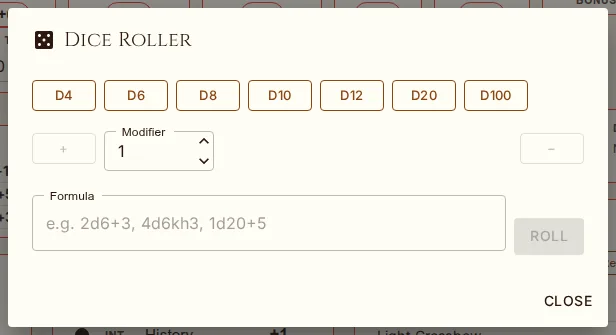
An animated dice roller is available at any time from the casino icon in the app bar (top of the page, always visible). Click it to open the dice roller dialog.
Quick Dice Buttons
The dialog provides quick-roll buttons for common dice:
d4, d6, d8, d10, d12, d20, d100 — each click adds a die to the formula (d6 d6 d20 builds 2d6+1d20)
Modifier field with + / − splices a static value into the formula
Click Roll (or press Enter) to roll the whole formula. A shake animation plays while the dice are rolling. History keeps the last 20 results and has a Clear button.
Custom Expressions
Enter any dice expression in the custom input field and press Enter or click Roll. The full dice DSL is supported:
| Expression | Description |
|---|---|
2d6+3 | Roll 2d6 and add 3 |
4d6kh3 | Roll 4d6, keep highest 3 (drop lowest) |
1d20+5 | Roll 1d20 and add 5 |
8d6 | Roll 8d6 (e.g., fireball damage) |
1d20-2 | Roll 1d20 and subtract 2 |
Roll History
The dialog displays a scrollable history of your recent rolls (up to 20 results). Each entry shows the expression rolled and the result. History is maintained for the duration of your session.